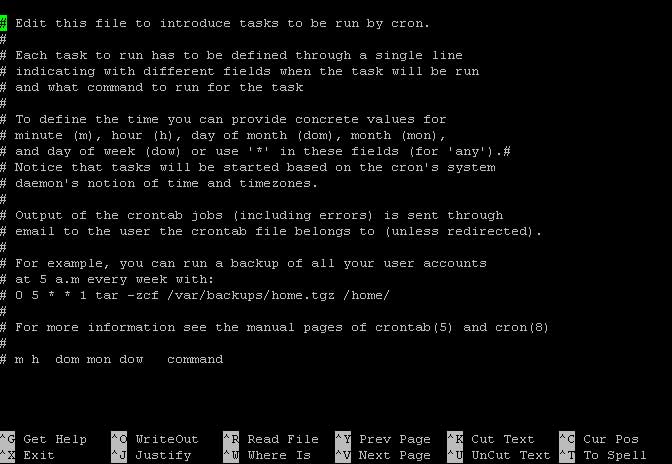
how to run the script below
* * * * * /usr/bin/wget -O - -q "http://example.com/scheduler/cron"
when i run the script, the error message show as below:
$ * * * * * /usr/bin/wget -O - -q "http://website.com/?q=admin/settings/scheduler/cron"
-sh: CHANGELOG.txt: not found
$ 30 15 * * * /usr/bin/wget -O - -q "http://website.com/?q=admin/settings/scheduler/cron"
-sh: 30: not found
can the script above run in ssh (using putty software)
Scott
November 1, 2012, 3:56am
2
The first five numbers and asterisks are for cron. You don't 'run' that part
If you want to run it with cron, type...
crontab -e
to edit your crontab file and paste the whole line there.
If you want to run it from the command line, remove the * * * * * or 30 15 * * *.
are you mean like this?
crontab -e /usr/bin/wget -O - -q "http://example.com/scheduler/cron
how to set time for it?
Scott
November 1, 2012, 4:11am
4
No, just
/usr/bin/wget -O - -q "http://example.com/scheduler/cron"
Sorry, I missed some text in my previous post. Updated.
If you want to run it with cron, type...
crontab -e
to edit your crontab file and paste the whole line there.
The first five fields (* * * * *, etc) tells cron when to run it. You don't need that on the command line.
scott:
No, just
/usr/bin/wget -O - -q "http://example.com/scheduler/cron"
Sorry, I missed some text in my previous post. Updated.
If you want to run it with cron, type...
crontab -e
to edit your crontab file and paste the whole line there.
The first five fields (* * * * *, etc) tells cron when to run it. You don't need that on the command line.
but i need the server run cron every 10minutes, how to set this?
Scott
November 1, 2012, 4:32am
6
Why didn't you just ask that from the beginning?
man -s5 crontab
just for confiramtionhttp://example.com/scheduler/cron "
than run
man -s5 crontab
is that correct?
Scott
November 1, 2012, 7:57am
8
No, that isn't correct.
I'm suggesting that you read the manual page for crontab so you can understand what you have to do.
Once you understand it, run crontab -e and add a line to run the job at the desired time.
i.e.
0,10,20,30,40,50 * * * * /usr/bin/wget -O - -q "http://example.com/scheduler/cron"
scott:
No, that isn't correct.
I'm suggesting that you read the manual page for crontab so you can understand what you have to do.
Once you understand it, run crontab -e and add a line to run the job at the desired time.
i.e.
0,10,20,30,40,50 * * * * /usr/bin/wget -O - -q "http://example.com/scheduler/cron"
when running man -s5 crontab
when running crontab -e
what so i do for next step?
Scott
November 1, 2012, 4:37pm
10
Before we go any further I need to know a couple of things.
What are you really trying to accomplish?
Who for (the 'who' can be you, that's OK - but then the question is 'why')?
What are you really trying to accomplish?IANA � Example domains
Who for (the 'who' can be you, that's OK - but then the question is 'why')?
can you list our step by step, thank you very much.
Scott
November 1, 2012, 5:29pm
12
IMO, you are too stupid to own a computer, so no, I can't.